
Today, everyone is searching on Google: ChatGPT advanced features 2026, ChatGPT features list, Top features of ChatGPT. But here’s the truth most people won’t tell you:
Using ChatGPT is easy.
Getting ChatGPT to do exactly what you want is difficult.
But after using ChatGPT daily for writing, research, and small tech tasks, I learned one thing: The free version already has many advanced features. You just need to know how to use them properly. Most users only scratch the surface. In this AI blog post, you’ll learn 7 simple but extremely powerful ChatGPT advanced features that even beginners can use — all in the free version — to move from a casual user to a smart AI user.

1. ChatGPT Canvas Feature – Stop Regenerating, Start Editing
Most people use ChatGPT incorrectly.
They request content, then make a minor change, and ChatGPT rewrites everything again. This is inefficient.
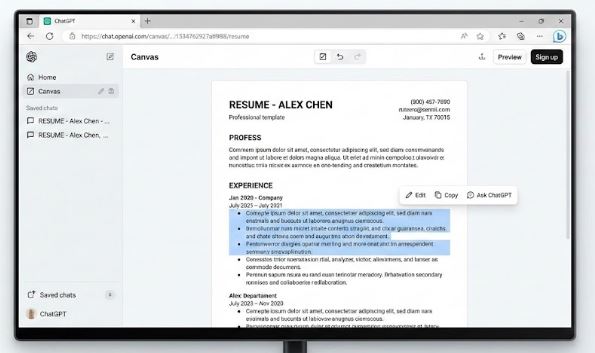
Canvas Feature solves this problem.
What Canvas Does:
- Opens your content in an editable document-style view
- Lets you edit text directly
- Allows ChatGPT to modify only the selected section, not the entire content
Real-Life Use Cases:
- Resume editing
- Blog post refinement
- Email or proposal polishing
Pro Tip:
Select a paragraph and type:
“Make this more professional and add numbers.”
ChatGPT will improve only that part, keeping the rest unchanged.
Canvas turns ChatGPT from a chatbot into your junior assistant.
2. Vision Mode – Upload Images Instead of Typing
ChatGPT can now analyze images, not just text.
What You Can Do with Vision Mode:
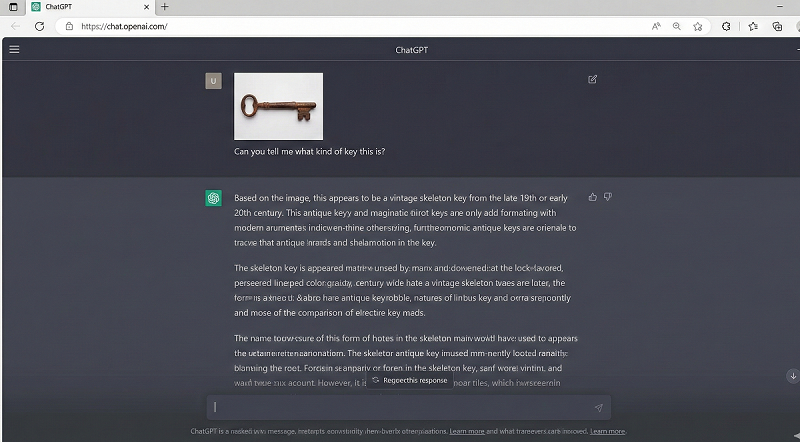
- Upload a fridge photo → get recipe ideas
- Upload product photos → compare and choose the best option
- Upload bills, forms, or notices → get simple explanations
- Upload website screenshots → identify UI/UX/code issues
Best Practice:
- Upload clear images, Add one line of context, for example: “This is a grocery shelf in a supermarket.”
Important Limitation:
- Blurry or dark images may lead to incorrect analysis. Always use common sense. Temporary Chat – Privacy Without Fear
Many users hesitate to ask personal questions about: Salary, Loans, Health, Relationships, and banking account-related questions.
Temporary Chat mode exists for this reason.
What Temporary Chat Does:
- Conversations are not saved
- No chat history is stored
- Data disappears after the session ends
Reality Check:
ChatGPT is not a doctor or lawyer. Do not take critical decisions blindly.
- ChatGPT App Store – From Ideas to Execution
ChatGPT is no longer limited to giving suggestions. It can now connect with real tools and perform tasks.
Popular App Integrations:
- Booking.com → Travel planning and price comparison
- Canva → Visiting cards, posters, and social media designs
Why This Matters:
- No need to open multiple apps
- ChatGPT handles analysis and execution together
- Saves time and effort
Limitation:
- App availability may vary in the free version
- Data accuracy depends on region
Always analyze first, then execute.
- Reverse Prompting – Learn How Creators Think
Ever seen an image ad or Instagram post and viral photo, video, you can asked:
“How was this created?” Now you don’t need to ask anyone.
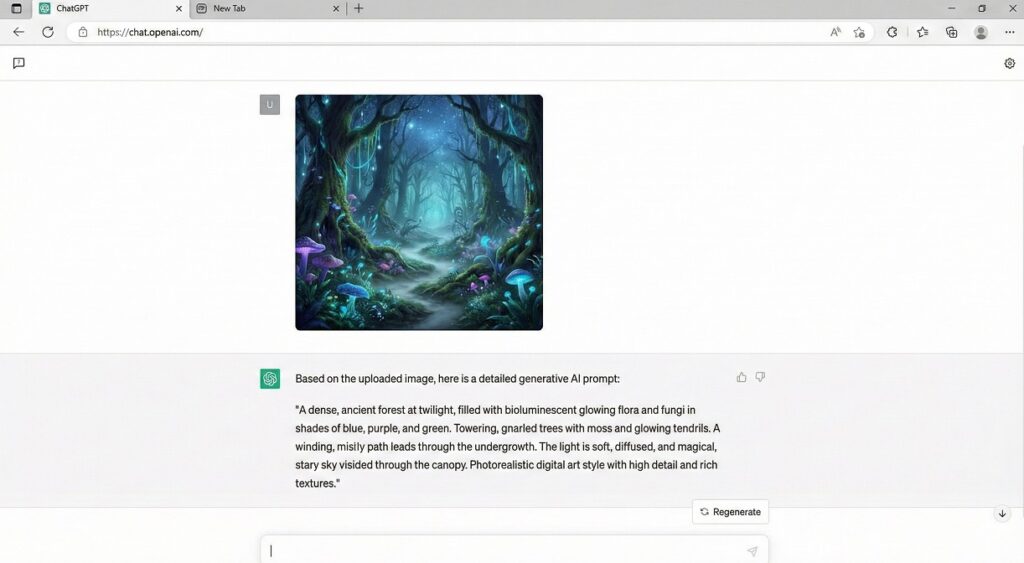
How Reverse Prompting Works:
- Upload the image or viral photo/video
- Ask ChatGPT: “Generate the prompt used to create this image/video.”
Also Read: Best AI Image Generators for Social Media
Best Use Cases:
- Learning AI image generation or video generation
- Improving prompt engineering skills
- Recreating design styles
Important Note:
The generated prompt cannot produce 100% original content, not an exact copy. Use it as a learning tool, not as a shortcut or for copying.
- Projects Feature – Organize Your Work Like a Pro
If your ChatGPT sidebar is filled with mixed conversations like:
- Office emails
- Travel plans
- Grocery lists
- Client work
You’re wasting potential.
What Projects Feature Does:
- Creates separate workspaces for different tasks
- Saves instructions permanently
- Stores reference files for repeated use
Example Project Setup:
Project Name: Office Emails
Instructions:
- Polite and professional tone
- Short paragraphs
- Clear subject lines
Every email generated inside this project will follow the same rules. One of the most underrated productivity features.
- The RIOS Prompt Formula – The Skill That Changes Everything
ChatGPT does not give bad answers. It receives bad prompts. You haven’t explained it to the AI by giving the correct prompt.
RIOS Formula Explained: for Best output
- R – Role: Who should ChatGPT act as?
- I – Instruction: What task should it perform?
- O – Output: What format do you want?
- S – Specifics: Budget, tone, audience, constraints
Bad Prompt:
Goa trip plan
Good Prompt:
Act as a budget travel planner. Create a 3-day Goa trip plan in table format for a couple with a ₹20,000 budget, peaceful locations, and minimal crowds.
This formula alone can double the quality of your results.
Final Conclusion
ChatGPT is not complicated. Most people just use it casually. If you understand and apply these 7 powerful ChatGPT features, you can: Save time, improve output quality, and get maximum value from the free version. ChatGPT is not just a tool — it is a skill.